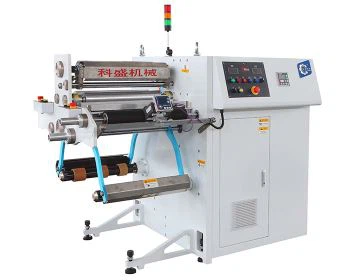
Hey there! As a supplier of the Reversible Inspection Machine, I'm stoked to share with you all the ins and outs of operating this nifty piece of equipment. Whether you're new to the game or just looking to brush up on your skills, this guide's got you covered.
Getting Familiar with the Reversible Inspection Machine
First things first, let's talk a bit about what the Reversible Inspection Machine is all about. This machine is a real game - changer in the inspection process. It's designed to thoroughly examine materials, whether it's film, paper, or other flexible substrates, in both forward and reverse directions. This two - way inspection capability allows for a more comprehensive check, ensuring that no defects are missed.
Pre - operation Checks
Before you fire up the machine, it's crucial to do a quick pre - operation check. This is like giving your car a once - over before a long drive.
- Visual Inspection: Walk around the machine and look for any obvious signs of damage, like loose wires, broken parts, or leaks. If you spot anything amiss, don't try to operate the machine right away. It's better to get it fixed first.
- Power Supply: Make sure the power supply is stable and properly connected. A fluctuating power source can cause all sorts of problems, from inaccurate inspections to damaging the machine's components.
- Material Loading: Check the material you're going to inspect. It should be loaded correctly onto the machine. The edges should be aligned, and there shouldn't be any wrinkles or tangles. If the material isn't loaded properly, it can affect the inspection results.
Starting the Machine
Once you've completed the pre - operation checks, it's time to start the machine. Here's how:


- Turn on the Power: Locate the power switch, usually on the control panel, and flip it to the "On" position. You'll hear the machine start to hum as it powers up.
- Initial Setup on the Control Panel: The control panel is like the brain of the machine. Use it to set the basic parameters for the inspection. This includes things like the speed of the inspection, the sensitivity of the sensors, and the direction (forward or reverse). It might take a bit of practice to get these settings just right, but don't worry, you'll get the hang of it.
- Check the Display: The machine will usually have a display screen that shows important information like the current status, any error messages, and the inspection progress. Make sure everything looks normal before you start the actual inspection.
Operating the Machine During Inspection
Now that the machine is up and running, here's how to keep things going smoothly during the inspection:
- Monitor the Process: Keep an eye on the material as it moves through the machine. Look for any signs of defects on the display or the actual material itself. Our PLC Control High Speed Inspection Machine is equipped with advanced sensors that can detect even the smallest imperfections, but it's still a good idea to visually confirm.
- Adjust Settings if Needed: Depending on the quality of the material and the inspection results, you may need to adjust the settings on the control panel. For example, if you're finding a lot of false positives, you can try reducing the sensor sensitivity.
- Handle Defects: When a defect is detected, the machine will usually alert you. You can then decide how to handle it. Some machines allow you to mark the defective area, while others may stop automatically. If the defect is minor, you might choose to continue the inspection and deal with it later. But if it's a major issue, you may need to stop the machine and remove the defective section of the material.
Reversing the Inspection
One of the key features of the reversible inspection machine is its ability to inspect in reverse. Here's how to do it:
- Pause the Inspection: Before you reverse the direction, hit the pause button on the control panel. This will stop the material from moving forward.
- Change the Direction Setting: Use the control panel to switch the inspection direction from forward to reverse. Make sure to double - check that the setting has been changed correctly.
- Resume the Inspection: Once the direction is set, hit the resume button. The machine will now start inspecting the material in the reverse direction. This can be really useful for getting a different perspective on the material and catching any defects that might have been missed during the forward inspection.
Stopping the Machine
When the inspection is done, it's time to stop the machine. Here are the steps:
- Press the Stop Button: Locate the stop button on the control panel and press it. The machine will gradually come to a halt.
- Power Off: After the machine has stopped moving, turn off the power switch. This will prevent any accidental startups and save energy.
- Remove the Material: Once the machine is powered off, carefully remove the inspected material from the machine. Make sure to handle it gently to avoid any damage.
Maintenance Tips
To keep your reversible inspection machine in top shape, regular maintenance is a must.
- Clean the Machine Regularly: Dust and debris can accumulate on the machine over time, which can affect its performance. Use a soft, dry cloth to clean the exterior and the sensors. For the interior parts, follow the manufacturer's cleaning instructions.
- Lubricate Moving Parts: Some parts of the machine, like the rollers and bearings, need to be lubricated regularly. Check the user manual to find out which parts need lubrication and what type of lubricant to use.
- Check and Replace Worn - out Parts: Over time, some parts of the machine may wear out. Keep an eye on critical components like the sensors, belts, and motors. If you notice any signs of wear, such as fraying or strange noises, replace the parts as soon as possible.
Other Related Machines
We also offer a range of other inspection and processing machines that you might find useful. The Flexible Packaging Rewinding Machine is great for rewinding and packaging flexible materials. Our PLC Control High Speed Inspection Machine for Printing Film is specifically designed for inspecting printing films at high speeds. And if you're in need of a machine to clean rolls, our Roll Doctor Machine is the perfect choice.
Conclusion and Call to Action
Operating a reversible inspection machine doesn't have to be complicated. With a bit of knowledge and practice, you can become a pro at it. Whether you're in the packaging, printing, or other industries, our machines can help you improve the quality of your products and increase efficiency.
If you're interested in learning more about our reversible inspection machines or our other products, don't hesitate to reach out. We're always happy to have a chat, answer your questions, and discuss how our machines can meet your specific needs. You can start a conversation with us to explore the possibilities of integrating our machines into your production process.