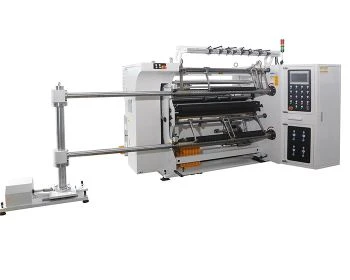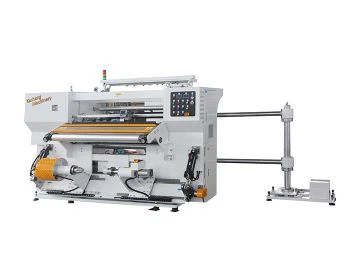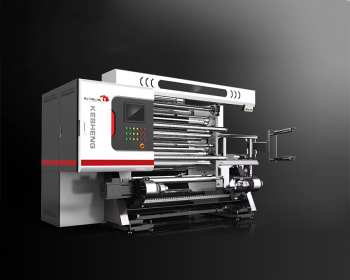
As a plastic film slitter machine supplier, I've spent thousands of hours walking plant operators, production supervisors, and maintenance technicians through breakdowns of their equipment. Nothing stops a packaging line, a label production shop, or a flexible manufacturing facility faster than a slitter machine going dark mid-run. Whether you're processing Bopp film for snack packaging, LDPE for shipping bags, or clear plastic for bottle labels, a sudden stop doesn't have to mean calling a technician (or your supplier) before you've tried these troubleshooting steps. Let's walk through a structured, step-by-step approach to get your machine back up fast-without guesswork.
Start with the Basics: The "Quick Check" That Solves 30% of Breakdowns
Before you dive into opening control panels or inspecting slitting knives, start with the simplest, most often overlooked issues. I've had a customer in Ohio call me at 2 a.m. because their High Speed Bopp Slitting Machine had stopped, only to find a tripped circuit breaker on the wall behind the machine (it had flipped when the line jostled a water cooler nearby). Another time, a small label shop's slitter shut down because their plant's AC had failed, triggering an overheat cut-off in the machine's motor system.
First, verify the power supply: Check the main disconnect switch, the machine's internal circuit breakers, and the control panel's indicator lights. If the power is on but the HMI (human-machine interface) is unresponsive, check for a loose Ethernet or power cable plugging into the back of the control box. Next, confirm the emergency stop (E-stop) button isn't engaged-this sounds obvious, but 1 out of 5 first-time callers miss that the big red button on the side or top of the machine was bumped by a roll of plastic film.
If the power checks out, next look at the material path. Many slitter machines stop as a safety feature if the plastic film is misaligned, jammed, or feeding unevenly. Open the machine's side guards and look for the film: Is it off-center on the unwind roll? Did it wrinkle around the rollers? A small fold can trigger a tension sensor stop, a critical safety feature that prevents the film from snapping or damaging the slitting knives. Clear any small jams by gently pulling the film out (never yank, which can tear the film or bend knives) and re-thread it per the machine's manual. For bottle label-specific issues, a common jam is small scraps of label film caught between the slitter's rewind spools-double-check that area if you're running narrow label stock.
Diagnostic 1: Control System and Sensor Issues
If the basic checks don't fix the problem, the next step is to rule out control system and sensor failures, which account for about 40% of unplanned slitter stops. Modern plastic film slitter machines rely on a network of sensors to detect film tension, roll position, and blade alignment-one faulty sensor can shut down the entire line.
Start with the tension sensors, which are the most commonly misaligned or dirty. Tension sensors measure how tight the film is as it moves through the slitter; if they're covered in plastic dust, lint, or film residue, they can send a false "too loose" or "too tight" signal to the control system, triggering a shutdown. To clean them, use a soft, lint-free cloth and isopropyl alcohol-avoid harsh chemicals that can damage the sensor's delicate coating. On Plastic Film Slitting Machine models, tension sensors are typically located near the unwind and rewind sections, so check both ends.
Next, check the proximity sensors that detect the presence of film on the unwind or rewind rolls. These sensors are small metal or optical devices that trigger a stop if a roll runs out. If the sensor is dirty, misaligned, or wired loosely, it might think the roll is empty even when it's not. Test a proximity sensor by placing a small piece of metal (for inductive sensors) or a piece of film (for optical sensors) near its front-if the control panel doesn't register the presence, the sensor is faulty. You can also test the sensor's wiring: Disconnect it and use a multimeter to check for continuity; if there's no continuity, the wiring is broken or the sensor needs replacement.


For machines with touchscreen HMIs, error codes are your best friend. Most modern slitters display a specific code when a sensor or control component fails-for example, code E03 might mean a tension sensor fault, while E07 could be a motor overload. Write down the error code before you contact your supplier, as it will help us diagnose the problem much faster. If the HMI is blank or unresponsive, try resetting the control system: Turn off the main power, wait 5 minutes (this lets capacitors discharge, which can clear minor glitches), then turn the power back on. This simple reset fixes 15% of control-related issues, especially after a power surge.
Diagnostic 2: Motor, Blade, and Mechanical Component Failures
If the control system checks out, the problem is likely mechanical. Slitter machines rely on motors, blades, rollers, and gears to cut and rewind plastic film, and any of these components can fail without warning.
First, check the main drive motor. If the machine makes a grinding noise when you try to start it, or the control panel shows a "motor overload" error, the motor is likely overheated or seized. Overheating usually happens if the machine was run continuously for too long without ventilation, or if the air filters around the motor are clogged with dust. Clean the air filters with compressed air (use a low-pressure setting to avoid damaging the filter) and let the motor cool for 30 minutes before trying to restart it. If the motor still won't run, check the motor's thermal fuse-this is a safety device that cuts power if the motor gets too hot, and it will need to be reset or replaced if it tripped.
Next, inspect the slitting blades, which are critical to cutting the film evenly. Blades can go dull, get nicked by hard plastic scraps, or become misaligned, which can cause the machine to stop to prevent damage. For circular slitting knives (used in Automatic Slitter Rewinder Machine with Circular Slitting Knife models), check for burrs or dents on the cutting edge-run a finger (very gently) along the blade to feel for unevenness. If the blade is damaged, you can either sharpen it (many suppliers offer blade sharpening services) or replace it. For shear blades (used for thicker plastic film), check if they're aligned properly: Misaligned shear blades can cause the film to bunch up, triggering a jam that shuts down the machine. Adjust the blade gap according to the film thickness-most machine manuals specify a gap equal to 10% of the film's thickness for optimal cutting.
Don't forget the rollers and idlers, which guide the film through the machine. Dirty, worn, or misaligned rollers can cause film to wrinkle or feed unevenly, leading to stops. Check the surface of the rollers for scratches, build-up of plastic residue, or dents-if a roller is damaged, replace it or have it resurfaced. Also, check the roller bearings: Worn bearings can cause the roller to spin unevenly, putting extra strain on the motor and triggering an overload stop. To test bearings, turn each roller by hand-if it doesn't spin smoothly or makes grinding noises, the bearings need to be lubricated or replaced.
When to Call Your Supplier (And What to Prepare)
After going through these steps, if your machine still won't run, it's time to reach out to your slitter machine supplier. But before you call, have these details ready to make the process faster and more efficient:
- The machine model and serial number (you can find this on the metal plate on the machine's frame)
- The error code displayed on the HMI (if any)
- A description of what happened right before the stop: Did you just finish running a new type of film? Did the machine make unusual noises or smells? Was it running continuously for a long time?
- Photos of the machine's control panel, the material path, and any damaged components (like blades or rollers)
As your plastic film slitter machine supplier, I always tell customers that the earlier you have these details, the faster we can resolve the issue. For example, if you have a High Speed Plastic Film Slitter Machine with an error code E10, we'll know immediately to check the rewind tension sensor, instead of asking you to go through every diagnostic step from scratch.
I also recommend regular maintenance to prevent breakdowns in the first place. Every 1,000 hours of operation, have a technician inspect the blades, clean the sensors, lubricate the bearings, and check the control system. Many of my customers schedule semi-annual maintenance during slow production periods, which cuts their unplanned downtime by 60%-a huge savings for packaging and label shops that run 24/7.
If you're looking to upgrade your current slitter machine to reduce breakdowns, we offer a range of models tailored to different applications: for bottle label production, the Bottle Label Slitting Machine is designed for narrow, precise cuts that reduce jams and errors; for Bopp film processing, our High Speed Bopp Slitting Machine has advanced tension control that minimizes stops due to misalignment. No matter your film type or production volume, we have a slitter machine built to meet your needs.
Don't let a slitter breakdown derail your production schedule. If you've gone through the troubleshooting steps above and your machine still isn't working, reach out to us to discuss your specific issue and find the right solution for your operation.