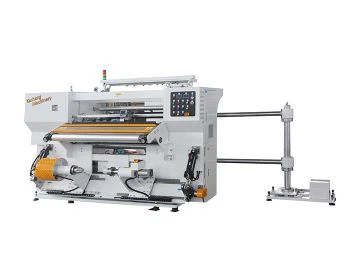
If you're a small business owner, packaging operator, or just someone who relies on mini rewinding machines to keep your daily runs moving, you know how frustrating it is when one suddenly acts up. Over the 7 years I've been supplying rewinding equipment, I've fielded hundreds of panic calls from people whose machines are spitting out uneven rolls, making weird noises, or just flat-out refusing to work. The good news? Most issues aren't that complicated to fix-you just need to know where to start and what to check. Let's walk through the most common problems, step-by-step, so you can get your machine back up and running without waiting for a service tech (or dropping hundreds on a new part when you don't need to).
First, a quick reality check: mini rewinding machines, whether they're the ones we call Small Rewinding Machine for general use, the Label Rewinder Machine for precision work, or our Mini Re Reeling Machine for Soft Packaging, are built to be simple, but they still have moving parts that wear out. I always tell new customers: if your machine worked fine yesterday and is messed up today, it's almost never a broken core part-it's something small you missed. Let's start with the easiest checks, because half the time that's where the problem is.
Step 1: Fix the Roll Tension (90% of minor issues start here)
Tension is make-or-break for rewinding. If the roll's too loose, it'll slip and look messy; too tight, and it'll wrinkle, stretch, or even snap the material mid-run. I can't tell you how many customers call me saying their machine is "ruining all their labels" and it's just that the tension knob was bumped while moving the machine.
Here's the test: Turn the machine on, feed a 6-inch length of material through the rollers, then shut it off. Gently grab the material between the two main rewinding rollers and pull straight down. If it slips easily, it's too loose; if it doesn't move at all, it's too tight. Adjust the tension knob (it's usually on the side of the rewinding shaft) in small increments-1/4 turn at a time. For label work, the Label Rewinder Machine specifically needs lower tension because label stock is thin and prone to stretching, while the Mini Re Reeling Machine for Soft Packaging might need a little extra tension to keep films from wrinkling. If you're still fighting tension issues after that, check the rollers themselves: are they dusty? Wipe them down with a microfiber cloth and a little rubbing alcohol (not harsh cleaners!)-dust is the #1 hidden culprit for uneven tension.


Step 2: Stop the Strange Noises (No, it's not a ghost)
If your machine is squealing, grinding, or making a thumping noise that wasn't there before, don't ignore it-it'll turn into a bigger problem fast. The first place I always look is the bearings. Bearings are small metal parts that let the shafts spin smoothly, and if they get dusty, dirty, or run low on lubricant, they make noise. On most mini rewinding machines, the main bearings are on the ends of the rewinding and unwinding shafts. You don't need to take the whole machine apart-just pop off the small plastic covers on the shaft ends, squirt a tiny bit of food-grade lubricant (or white lithium grease, not motor oil!) into the bearing, and spin the shaft by hand for a second. That usually takes care of the high-pitched squeal.
If the noise is a loud thump, that's probably a misaligned roll core. When you slide a cardboard or plastic core onto the rewinding shaft, it needs to sit all the way in, not wobbly. I've seen customers just drop the core on the shaft and start the machine-boom, thumping the whole time. Pull the core off, make sure the shaft isn't bent (run your finger along it to feel for dents), then push the core all the way onto the keyway on the shaft. Most mini machines have a small set screw to lock the core in place-snug that up, not too tight, and the thumping should stop. And hey, if your Label Rewinder Machine is making noise only when rewinding narrow labels, double-check that the side guides aren't cranked too tight against the roll-they shouldn't touch the material, just keep it straight.
Step 3: Fix Uneven Rolls or Material Slippage
Nothing looks worse than a roll that's lopsided or has gaps between layers. If you're getting that, first check your material feed. Is the material feeding straight into the machine, or is it curving? Most mini rewinding machines have side guides to keep the material aligned-adjust them so they're just barely touching the edges of the material (no pinching!). A lot of people crank the guides down to "hold it tight" and that causes stretching or bunching.
Another common issue: slippage between the drive roller and the material. If the drive roller (the one that spins to pull the material) is dusty or worn, it won't grip the material properly, so the roll will spin but the material won't advance evenly. Wipe the drive roller with a cloth to get rid of any adhesive or dust, and if it's smooth (some drive rollers are textured for grip), run a piece of fine-grit sandpaper (220 grit) over it gently to add a little texture. If you're working with thicker materials, like the Mini Re Reeling Machine for Soft Packaging uses for films, make sure the pressure roller (the one that presses the material against the drive roller) is adjusted so it's not too loose. You should be able to lift it with one finger, no more.
Step 4: Electrical and Motor Glitches (For when the machine won't turn on)
Okay, so tension is good, no weird noises, but the machine won't power on. Don't panic-this is almost always a simple electrical issue. First, check the plug: is it firmly pushed into the outlet? Try plugging another device into the same outlet to make sure it's working. If it is, check the power cord for frays or kinks-mini machines are often moved around, and the cord can get pinched between a shelf and the machine. If you see a fray, don't use it until you replace the cord (safety first!).
If the power is good, but the motor hums but won't spin, that's usually a blockage. Look around the shaft and rollers-did a piece of material get stuck in the gap between the drive roller and the side frame? A tiny piece of paper or film can stop the motor dead. Unplug the machine first, then reach in with a pair of tweezers to pull out the stuck material. One thing to note: the Automatic High Speed Rewinding Machine has a more powerful motor, so glitches here might be a little different, but 80% of the time it's still a stuck piece of material or a loose connection. If you're still having electrical issues, check the internal fuse-most mini machines have a small fuse compartment on the back, near the power cord. Swap it with a spare (we include spares with every machine we sell!) and try again.
Step 5: When to Call for Backup (Don't waste time on broken parts)
Let's be real-some issues are beyond basic troubleshooting. If you've gone through all the steps above and your Vertical Type Slitter Rewinder Machine for Plastic is still slitting unevenly, or the rewinding shaft is bent, that's when you should reach out. Don't try to straighten a bent shaft with a hammer-you'll just make it worse, and it'll damage other parts. The good thing about buying from a supplier that supports small businesses is that you don't have to guess: we've worked through every possible issue with our range, from Small Rewinding Machine for home use to industrial label machines, and we can walk you through exactly what to do.
A quick pro tip from 7 years in the game: Do a quick check after every use. Wipe the rollers down, pull any stuck material out, and make sure the core is removed. This prevents dust buildup and small issues from turning into big ones. I've had customers who use their machine daily and keep it clean for 3 years with zero major repairs, and others who leave it in a closet covered in dust and have to replace a motor after 6 months.
At the end of the day, mini rewinding machines are built to be user-friendly, but they still need a little care. Most issues are fixable in 10 minutes with a screwdriver, a cloth, and a little patience. If you've tried every step and still can't get yours working, feel free to reach out-we're here to help you get back on track. Whether you're looking for a replacement part, a new machine, or just need to ask a quick question about your current setup, we can guide you.